
Ransomware: what actually stops it
The five stages of a ransomware attack, the defence that interrupts each one, and why the backup you make today matters more than the scanner you buy.
Background explainer, no partner links. How the site is funded: affiliate disclosure.
Why ransomware is the awkward case for security software
Ransomware is the threat most often used to sell consumer protection, and it is the one where software alone is least sufficient. Every other malware category is, in principle, reversible: remove the thing, restore the machine, change the passwords. Ransomware is not. Once strong encryption has completed, no security product can undo it. Detection has to happen before that point or it does not help.
That is not an argument against protection. It is an argument for understanding that the scanner is one of several controls, and the last one — backup — is the only one that still works after everything else has failed.
Stage 1 — delivery
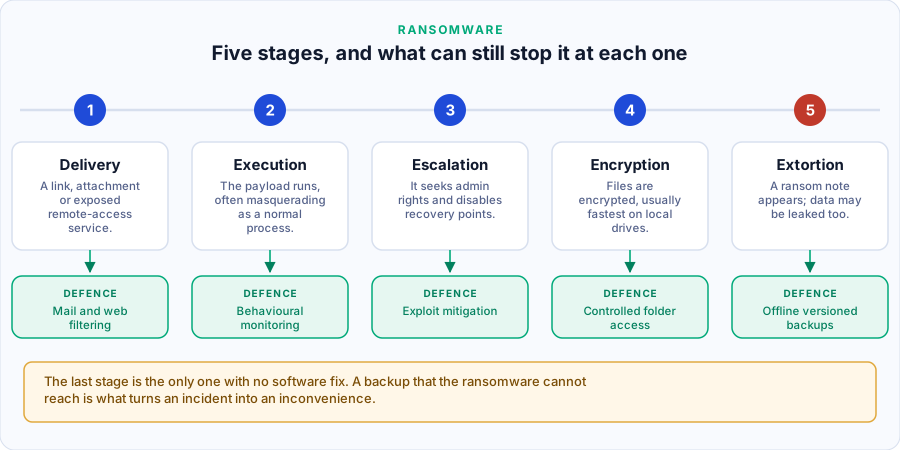
The payload arrives: an attachment, a link, a malicious advert, a compromised software update, or — for home users with a network-attached drive or a remote desktop left exposed — an internet-facing service with a weak or reused password. Mail and web filtering intercept some of this. Not opening unexpected attachments intercepts more.
Stage 2 — execution
The payload runs, frequently by abusing tools already present on the system rather than by dropping an obviously malicious binary. Behavioural monitoring is the control that matters here, because there may be no suspicious file to find.
Stage 3 — escalation and preparation
Before encrypting anything, competent ransomware tries to acquire administrative rights, delete Windows volume shadow copies, disable recovery, and stop backup services and database processes so that files are not locked. This stage is a gift to defenders: deleting shadow copies is not something ordinary software does, and it is a strong, reliable behavioural signal.
Stage 4 — encryption
Files are encrypted, local drives first, then anything mapped or reachable on the network — which is exactly why a permanently connected backup drive is a liability. Controlled folder access, a feature built into Windows and available in third-party suites under various names, restricts which applications may write to your documents and photos at all.
Stage 5 — extortion
A ransom note appears. Increasingly the data has also been copied out and the threat is publication as well as loss. At this point your options are determined entirely by decisions you made earlier.
The control that still works after everything else failed
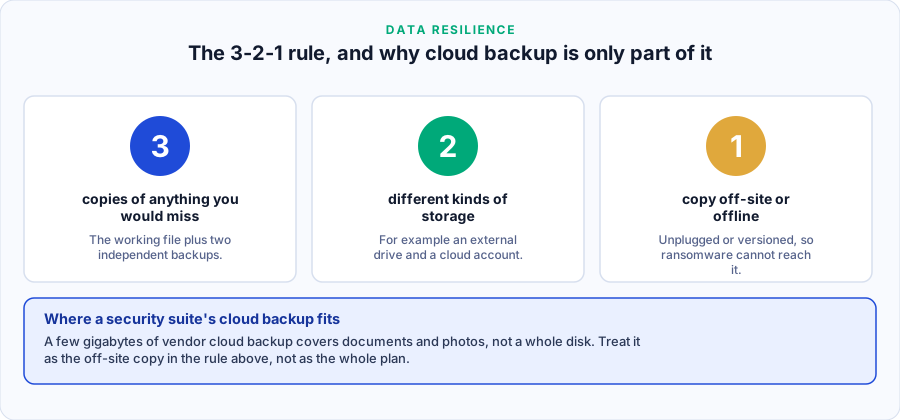
Backup. Not "there is a copy in my cloud drive" — a synchronising cloud drive faithfully synchronises the encrypted versions — but a copy the attack could not reach and could not overwrite. The long-standing formulation is the 3-2-1 rule, and CISA’s StopRansomware guidance still recommends it.
Two practical refinements for home users:
- Versioning beats synchronisation. A service that keeps previous versions of a file for thirty days lets you roll back. One that mirrors the current state does not.
- Unplug the drive. An external disk connected only while the backup runs cannot be encrypted the rest of the time. It is unfashionable advice and it is extremely effective.
A realistic home checklist
- Turn on automatic updates for the operating system and the browser. Closes stage 1 and stage 3 routes at no cost.
- Set up one versioned backup and one occasionally-connected local copy. Then test a restore once — an untested backup is a hypothesis.
- Enable controlled folder access, or the equivalent in whatever suite you run.
- Use a password manager and stop reusing passwords, particularly on any remotely accessible service.
- Turn on two-factor authentication for e-mail first; e-mail is the reset route for everything else.
- Do not expose remote desktop or a NAS administration panel directly to the internet.
- Run an anti-malware product with behavioural monitoring — the one built into Windows qualifies.
If it has already happened
- Disconnect the machine from the network immediately — this limits spread to other devices and to network shares.
- Do not pay reflexively. Payment funds the operation, is not a reliable route to recovery, and may carry its own legal complications.
- Photograph the ransom note and preserve the machine rather than wiping it at once; the family may be identifiable, and for some families free decryptors exist through the No More Ransom project, an initiative supported by Europol.
- Report it. In the Czech Republic, guidance is published by NÚKIB.
- Assume credentials stored on the machine are compromised and change them from a different, clean device.
Sources
- CISA — StopRansomware: stages, mitigation guidance and the backup recommendation.
- Europol — IOCTA: trends in ransomware and double extortion in Europe.
- No More Ransom: free decryption tools where they exist.
- ENISA — Threat Landscape.
- NÚKIB: Czech national guidance.